Learn how to create an Alpha account on LovesFeet. Follow this simple guide to register, verify your email, complete your profile, and get started
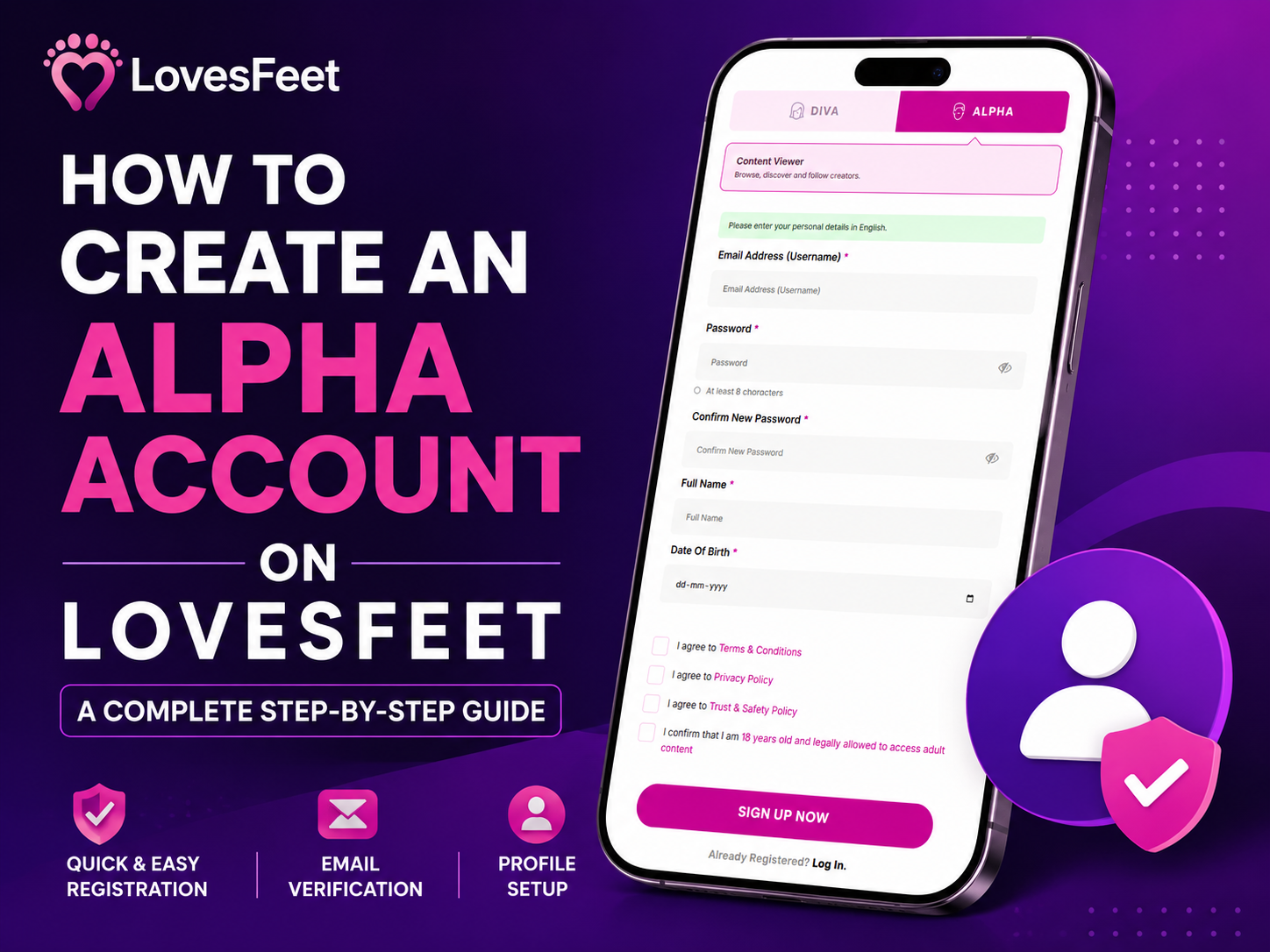
Creating an account on a new platform should not feel complicated. If you're interested in exploring foot content, following creators, and becoming part of a dedicated community, LovesFeet makes the Alpha registration process simple and straightforward.
An Alpha account is designed for users who want to browse, discover, and follow creators on the platform. Whether you're completely new to LovesFeet or simply want to understand what happens during registration, this guide will take you through the process from the first signup screen to your completed profile.
The registration process has three main stages: creating your Alpha account, verifying your email address, and completing your profile. Each stage takes only a few steps, and the information you provide helps LovesFeet maintain a safer and more reliable foot content marketplace.
Let's walk through the process.
Before getting started, it's useful to understand the purpose of an Alpha account.
On LovesFeet, an Alpha account is intended for users who want to participate as content viewers. You can use your account to browse the platform, discover creators, follow profiles, and explore available content.
During registration, the platform asks for basic personal information such as your email address, full name, and date of birth. Some of this information is required for account creation and age verification, while it is not intended to be displayed publicly on your profile.
LovesFeet also requires users to confirm that they are 18 years or older and legally allowed to access adult content.
Once your account and profile setup are completed, you can start using your Alpha account.
Start by opening the LovesFeet registration page.
You'll see two account types:
Select Alpha to begin the viewer registration process.
The Alpha option is labeled Content Viewer, with a short description explaining that Alpha users can browse, discover, and follow creators.
This makes it easy to choose the correct account type before entering your information.
After selecting Alpha, you'll be asked to complete the registration form.
The form requires several basic details:
The password must contain at least 8 characters, so choose something strong and unique that you don't use on another website.
Your date of birth is also an important part of the registration process because LovesFeet is an adult platform. You must confirm that you are 18 years old or older and legally permitted to access adult content.
Take a moment to check your information before continuing. Using the correct email address is particularly important because you'll need access to it for the next verification step.
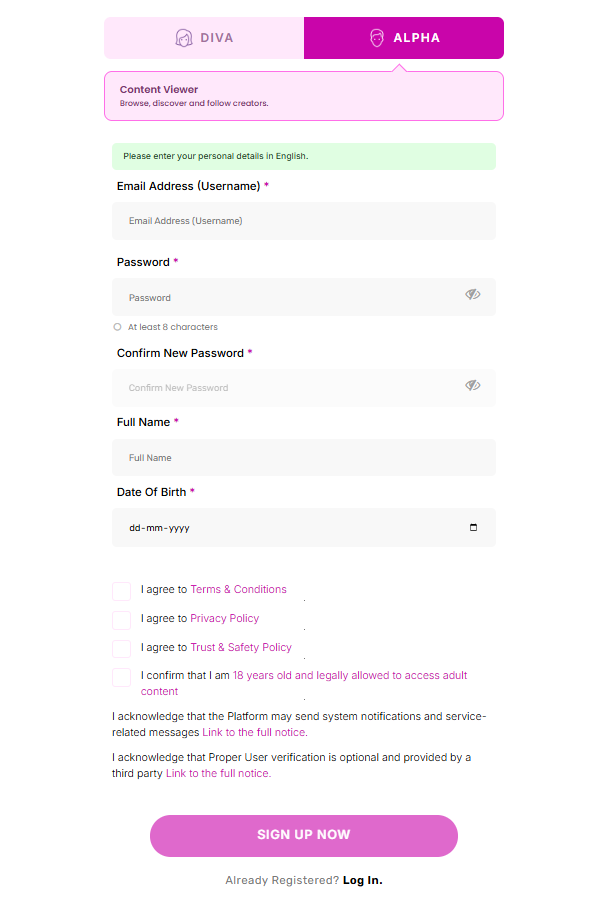
Before you can create the account, LovesFeet asks you to acknowledge several important terms and policies.
You'll need to agree to the platform's:
You'll also need to confirm that you are 18 years old and legally allowed to access adult content.
There are additional notices explaining that the platform may send system notifications and service-related messages, and that Proper user verification is optional and provided by a third party.
It's worth reading these policies before accepting them. Understanding how a platform handles your account, privacy, and safety helps you make informed decisions about using the service.
Once the required options have been selected, click Sign Up Now.
After submitting your registration form, the next step is email verification.
LovesFeet sends a 6-digit One-Time Password (OTP) to the email address you provided during registration.
You'll see six separate fields where you can enter the OTP. Enter the code exactly as it appears in the email and click Verify.
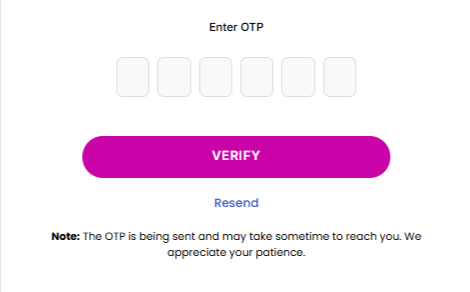
If the code doesn't arrive immediately, don't worry. Email delivery can sometimes take a little time.
Check your Spam or Junk folder first. If you still don't see the email, wait a few moments and use the Resend option.
Make sure you're checking the same email address you used when registering.
Email verification is an important security step because it confirms that you have access to the email account associated with your LovesFeet profile.
After successfully verifying your email, you'll move to the Profile Setup stage.
This is where you provide the information that will be used to create your LovesFeet profile.
The profile setup screen asks for information such as:
The Stage / Display Name and Handle are particularly important because they help identify your profile on the platform.
Your handle should be easy to remember and consistent with how you want to appear on LovesFeet. Your display name can be used to give your profile a more personal identity.
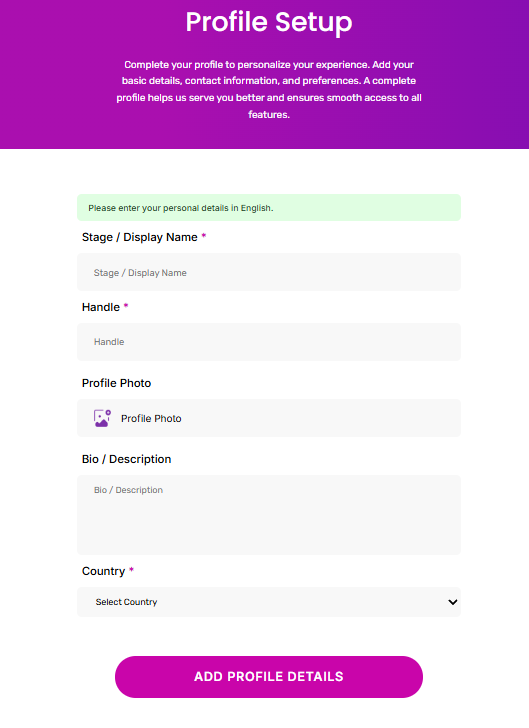
Although your profile photo is not marked as required in the setup form, adding one can make your profile feel more complete.
A recognizable and appropriate image can also make it easier for other members to identify your account when interacting with you.
The Bio / Description field gives you an opportunity to introduce yourself.
You don't need to write a long paragraph. A few natural sentences about your interests and what you enjoy discovering on the platform can be enough.
A complete profile generally feels more welcoming than one with only the minimum information.
You'll also need to select your country from the available list.
Providing accurate information helps keep your account details complete and supports the platform's location and language-related features.
Once you've finished entering your information, click Add Profile Details.
What would help you most when creating an Alpha account?
After completing the profile setup, your Alpha account creation process is complete.
At this point, you've gone through the key onboarding requirements:
Registration → Email Verification → Profile Setup
The process is designed to make sure that new users provide the necessary account information, verify their email address, confirm their age eligibility, and create a basic profile before getting started.
You can now use your Alpha account to explore LovesFeet as a content viewer.
Once your account is ready, you can begin exploring the platform and discovering creators.
As an Alpha user, you can browse the foot content marketplace, find creators you're interested in, and follow profiles you want to keep up with.
Your account also gives you a personalized presence on LovesFeet instead of simply browsing as an unregistered visitor.
As you become more familiar with the platform, keeping your profile information up to date can make your overall experience smoother.
Your profile doesn't need to be complicated. The goal is to make it clear, genuine, and easy to recognize.
Start with a display name and handle that you're comfortable using. If you decide to add a profile photo, choose one that represents you appropriately.
Your bio can be short, but avoid leaving it completely empty if you want your profile to feel more personal.
Most importantly, make sure your registration information is accurate. Your email address is used for verification, and your date of birth is required as part of the platform's age-related requirements.
Taking an extra 2–3 minutes to review everything before submitting can help avoid simple mistakes during registration.
You must be 18 years old or older and legally allowed to access adult content.
The email verification code contains 6 digits. Enter the complete code on the verification screen and select Verify.
Check your Spam or Junk folder first. If the email hasn't arrived, wait a few moments and use the Resend option.
The registration screen states that Proper user verification is optional and is provided by a third party. The required Alpha onboarding shown in this process includes account registration, email verification, age confirmation, and profile setup.
A profile photo is available during profile setup but is not marked as a required field. Adding one can help make your profile more complete.
An Alpha account is intended for content viewers who want to browse, discover, and follow creators. A Diva account is designed for creators who want to build a creator profile and share content on LovesFeet.
What is your main reason for creating a LovesFeet account?
Creating an Alpha account on LovesFeet is a simple process that can be completed in a few clear stages. You start by selecting Alpha, entering your registration information, accepting the required policies, confirming your age, and verifying your email with a 6-digit OTP.
After that, completing your profile with a display name, handle, photo, bio, and country gives you a more personalized presence on the platform.
For anyone looking to explore a dedicated foot content marketplace, getting started doesn't require a complicated setup. Follow the steps above, take a moment to check your information, and you'll be ready to discover what LovesFeet has to offer.

 Hebrew
 Russian
 Arabic


Share your thoughts