This guide explains the information requested when creating a Diva account and how registration differs from third-party identity verification. Check each screen before entering personal information. A public profile and the information supplied for account administration serve different purposes.
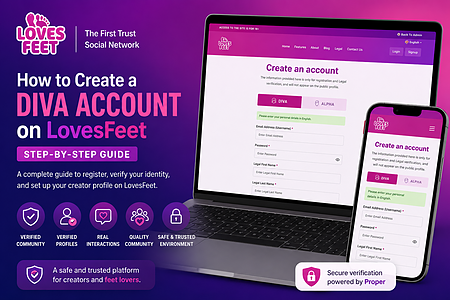
A Diva account is the creator account type. Registration requests account and personal details. Public profile details are a separate part of the account experience. Do not assume that creating an account establishes identity-verification approval.
The first step is creating your account.
Account information: Open the Diva registration form.
Fill in the registration form with your personal details, including:
Email address
Password
Legal first and last name
Date of birth
WhatsApp number with country code
You'll also need to agree to the platform's Terms & Conditions, Privacy Policy, Trust & Safety Policy, and age confirmation before clicking Sign Up Now.
Important: Your legal information is used only for registration and identity verification. It does not appear on your public profile.

Once registration is complete, LovesFeet sends a 6-digit One-Time Password (OTP) to your registered email address.
Enter the OTP on the verification page and click Verify.
If you don't receive the email immediately:
Check your Spam or Junk folder.
Wait a few minutes before requesting a resend.
Ensure you've entered the correct email address during registration.
Email verification protects your account and confirms that you own the registered email.

The public registration screen currently describes Proper User verification as optional and provided by a third party. If you choose or are asked to use it, follow the instructions shown in your account. Email confirmation, account creation and third-party approval are separate states. This guide does not promise an approval time.
This section creates the public profile that buyers will see.
You'll need to provide:
Stage or display name
Unique handle
Profile photo
Cover photo
Bio or description
Country
Languages spoken
A complete profile helps your follower learn more about you and increases trust.

When writing your bio, keep it authentic and explain the type of content you create. A genuine profile often attracts more followers than an incomplete one.
The final step lets you personalize your creator account even further.
Here you can add:
Personal website
Instagram handle
Twitter/X handle
Telegram username
Portfolio samples
Foot size
What you love most about your feet
These optional details help showcase your personality and build credibility as one of the growing foot niche creators on LovesFeet.

After completing the form, click Add Additional Details.
Congratulations! Your Diva account is now ready to use.
Review the distinction between your public profile and account-administration details before continuing. For a different account type, read the Alpha account guide. For questions about the current registration process, contact support.

 Hebrew
 Russian
 Arabic


Share your thoughts
Hello baby 💟 I'm here for buying a feet pic's for seller Dm me 🦶🦶❤️❤️❤️on my telegram:=davidswillia